
Sometime you may want to remove all the return (CR LF characters) from a text file, for example a .csv file.
This can be done in many ways but an easy one is the following, using the free Notepad++ editor that can be downloaded from its site. It is not so good as UltraEdit but it is free!!
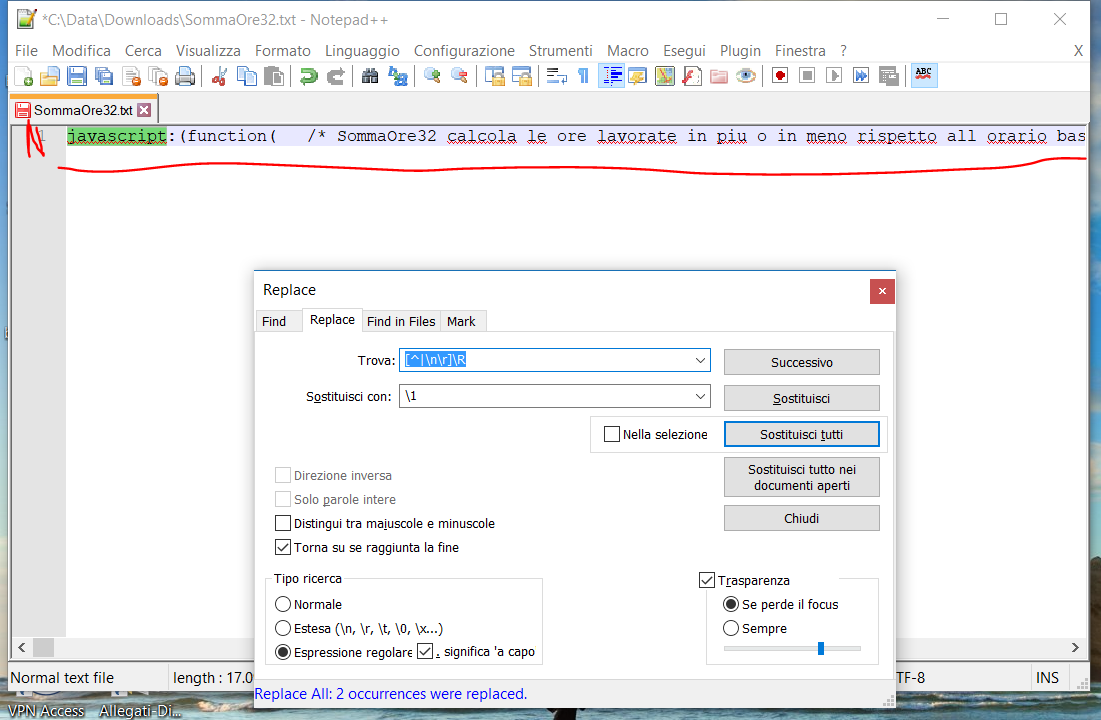
You can use its Find -> Replace… menu item and the put as
- Find: [^|\n\r]\R
and as
- Substitute with: \1
- Check Regular expression and possibly the other checkBox as shown in the following screenshot.
- Click on Replace All button
The provided regular expression matches OS-linebreaks (\R) that are not (^) preceded by a | or \r or \n so it should work with any EOL convention.
 You may have to click on Replace all button more times, till all the text will be on one single line:


 Enzo Contini Blog